Digital advertising is rapid nowadays. Short-form content is king on TikTok, Instagram Reels, and YouTube Shorts. Brands should make an impact fast. You require sharp images, good branding, and an easygoing message. This is where the CapCut App comes in.
Its AI lab provides high-performance tools to design professional, branded content in just minutes. It helps you transform ideas into refined advertisements, even if you lack video editing skills. These tools can be used to create content quickly and easily, whether you are marketing a product or creating a brand identity.
Branded Visual Tools: What Does it Include?
The CapCut App has it all when it comes to professional ad visuals. Begin with AI avatars and AI posters. Such tools bring your brand a personality and visual dimension. They help create a coherent identity that resonates with the audience.
Promotional use templates are already in place. These layouts use AI to enable you to drag and drop product images, add brand colors, and callouts. AI visuals are used to arrange clips sequentially with the help of the AutoCut tool. It automatically balances rhythm and pace, as well as transitions.
This leads to crisply coherent advertisements that are professionally done. There is no need to have a studio team, but you can use your phone and the CapCut App as a creative suite.
AI and the Design of Visual Consistency
Consistency in visuals is essential in all your advertising campaigns. It helps you maintain the clarity of your message. You can keep it with the CapCut App using customizable templates. Put brand logos, consistent fonts, and stick to your color scheme.
You may also match the tone of voice with the design. Select the poster styles that suit your brand's mood-from clean and corporate to bright and playful, all elements back your messaging. No matter how quickly you work, the CapCut App guarantees that every video is your visual identity.
Building Ads Not in Hours but in Minutes
Creating an ad using the CapCut App is easy. Select a template to fit your campaign. Include your product shots and photos. The platform allows one to insert animated text to capture attention instantly.
Need a voiceover or a catchy slogan? Both can be generated using built-in tools-no need to record or rewrite. You can view a real-time preview of your video and make adjustments on the fly. All this changes immediately.
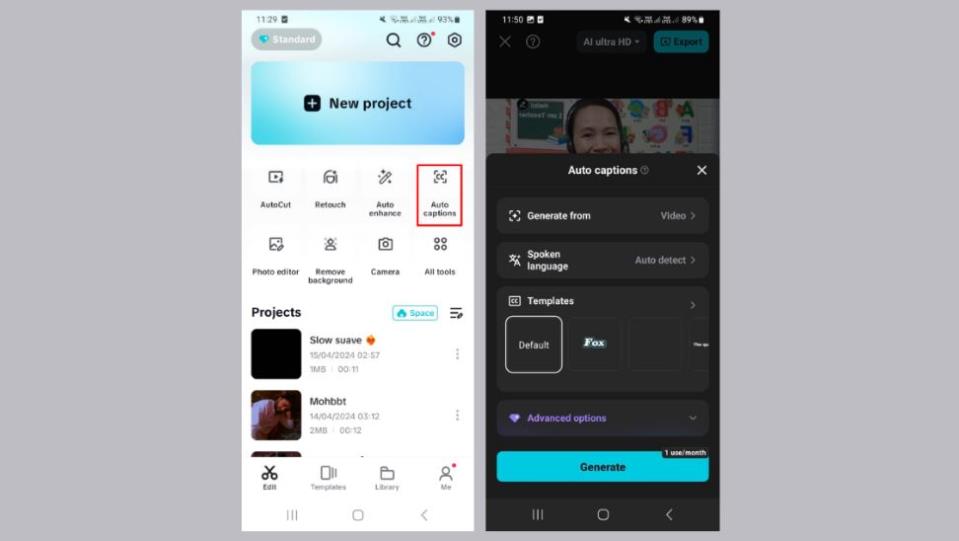
During this rapid production, the AI caption generator will assist you in adding intelligent and legible text. It makes your message easy to understand and enjoyable to read, even on tiny screens. This renders your advertisement mobile-first platform-friendly.
Lifting Ads with Movement, Effects, and AI Scenes
Short-form video is about motion and effects. The CapCut App offers the opportunity to create more dramatic ads through cinematic transitions and creative sticker packs. Ads can be made to feel more engaging by incorporating AI-generated dialogue scenes that bring characters and concepts to life visually.
These factors add narrative to your text. You do not have to be an illustrator or animator to create cinematic resonance. You can hook listeners within seconds, whether you want to appeal to their emotions or educate them about the product.
This is where the force of the AI video maker lies. You concentrate on the message, and the CapCut App does the rest, packaging it with music, visuals, and motion that talk very loudly.
Turn Scripts into Branded Content
Step 1: Tap into AI Lab and use AI story maker
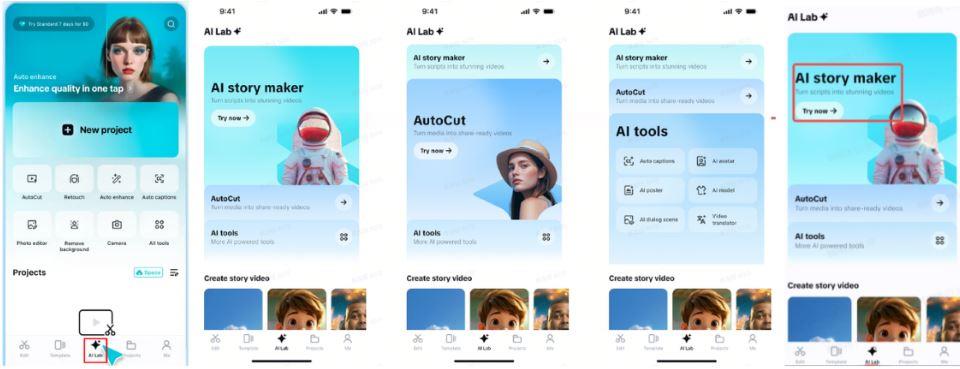
Open CapCut and go to the "AI Lab" section from the bottom menu. Inside, you'll find tools like "AI story maker", "AutoCut", and additional "AI tools". Choose "AI story maker" and press the "Try now" button to proceed.
Step 2: Design your branded video
Insert or write your ad script in the "Create AI story video now" input area. Choose a visual look-Anime, Cartoon 3D, or Realistic Film. Add a "Voiceover" to bring your ad to life and select your desired "Video ratio". Click "Generate" when done.
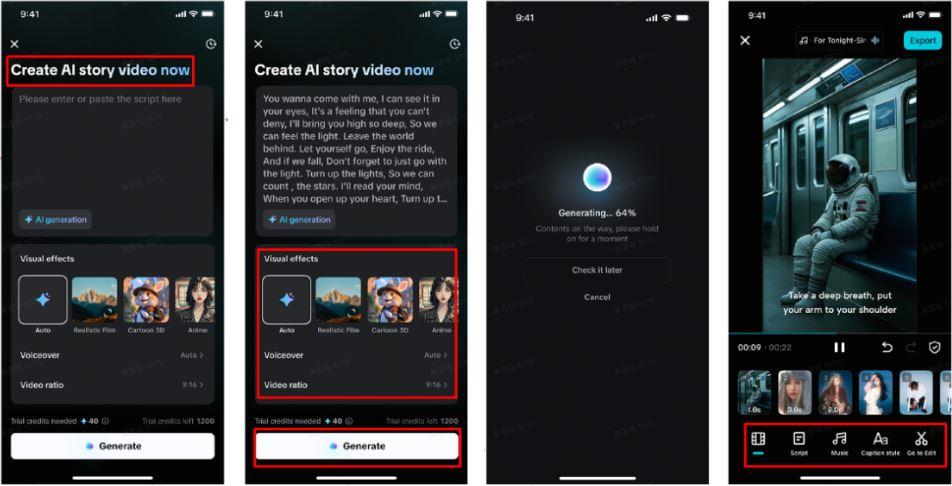
Once the ad is generated, visit "Music" to pick an audio track. Then go to "Caption style" to add flair to your text using fonts, effects, and animations. To enhance your ad further, press "Go to Edit" for advanced tools like filters, transitions, and stickers.
Step 3: Download and share online
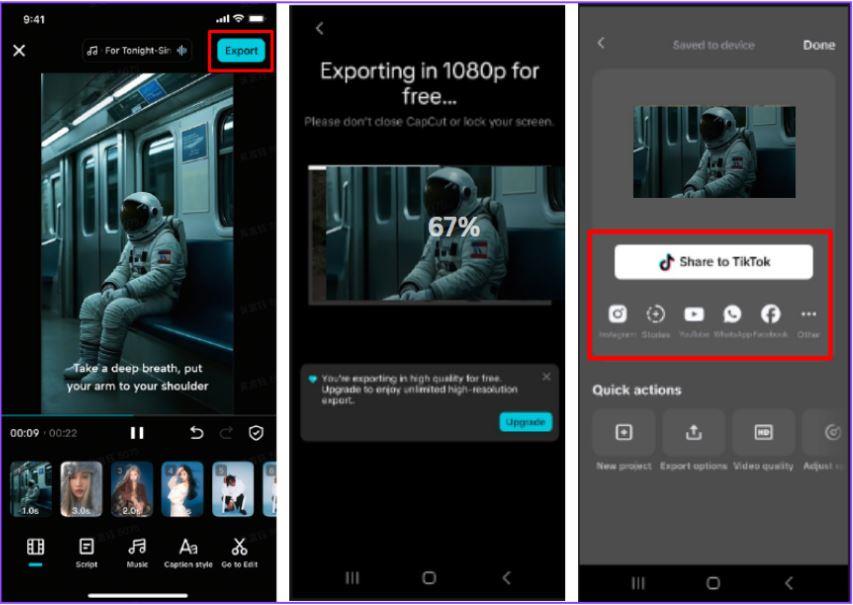
Preview your branded video and tap "Export" in the top-right. Your ad will be saved on your device and ready for sharing across social platforms.
Why CapCut's AI Tools Are a Marketer's Secret Weapon
Speed matters in advertising. The CapCut App enables faster campaign turnaround. You can go from idea to final video in one session. That agility gives you a competitive edge.
You also gain access to visually rich content made for social platforms. Whether for TikTok, Instagram, or Reels, your content fits right in. No extra formatting required.
Most importantly, the CapCut App requires no prior design or editing skills. Anyone can create stunning ads from a smartphone. You get professional results without hiring a creative team.
Conclusion
Branded visuals are now one tap away. With CapCut App's AI Lab, you no longer need long hours or complex software. You can generate cinematic, scroll-stopping ads in minutes.
This AI-powered platform makes scalable ad creation easy and stress-free. All you need is your product, a clear message, and the CapCut App in hand.
This is sponsored content.